Product Highlights
March 11th, 2026 Update
Integration Highlights
Restore & Comply Bundle Billing
Partners can now view, upgrade, and deploy Restore & Comply bundles directly within the platform. API support is also available, enabling automated provisioning and billing alignment across PSA and financial systems. This helps MSPs simplify operations while maintaining accurate billing.
Cybersecurity Highlights
Customised Warning Banners
Warning banners can now include the MSP’s name, helping reinforce the MSP’s role in protecting the customer environment while providing clear guidance to end users when a suspicious email is detected.
Full MSP Branding Across the Platform
MSPs can apply their logo and display name across the entire platform with a single click. This ensures consistent branding across security tools and strengthens the MSP’s position as the trusted security provider for their customers.
New Email History View: Total Visibility, Simplified Management
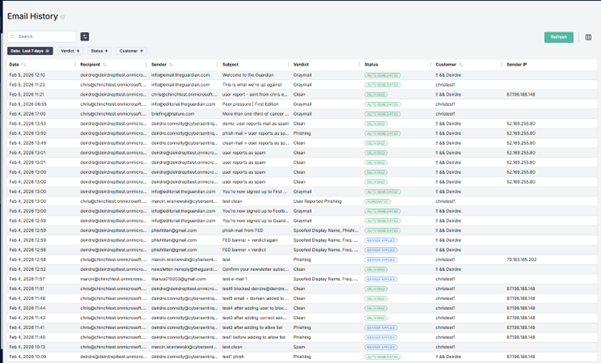
CyberSentriq have introduced a powerful new ‘Email History’ page to the CyberSentriq platform, available at both the MSP and customer levels, giving administrators unprecedented visibility into all email activity analyzed by the platform.
This is a capability that did not previously exist, and it fundamentally improves oversight, troubleshooting, and security confidence.
What’s New?
- Complete email visibility: Administrators can now view all emails processed and analyzed by the platform in one centralized view.
- MSP-level oversight: MSP administrators can see the full list of emails processed across all customer tenants, making it easy to monitor activity, investigate incidents, and demonstrate value at scale.
- Customer-level transparency: Customer admins gain access to their own email history, enabling faster internal reviews, clearer reporting, and greater trust in the protection being delivered.
Benefits for MSPs
- Centralized control across customers: Quickly review email activity across your entire customer base without jumping between tenants.
- Faster incident response & troubleshooting: Easily investigate suspicious emails, validate detections, and resolve customer queries in minutes—not hours.
- Stronger security posture reporting: Use concrete email data to show customers exactly what threats are being analyzed and stopped, reinforcing the value of your managed service.
- Operational efficiency at scale: Reduce support overhead with a single, intuitive view of all processed emails across all customers.
Benefits for SMB Customers
- Greater transparency and confidence: See exactly how email threats are being analyzed and handled, building trust in your security solution.
- Simplified audits and reviews: Quickly access historical email data for compliance checks, internal investigations, or peace of mind.
- Improved collaboration with your MSP: Shared visibility means clearer conversations, faster resolution, and fewer back-and-forth support tickets.
This feature is available to accounts licensed for email security. If your account includes email security, you can start using Email History immediately, no additional setup required.
MSP level view
Quizzes on Security Awareness Training
The latest update to SAT introduces quizzes, helping organisations verify understanding, not just completion of training.
This update also includes a newly redesigned training experience, guiding users through a clear and structured flow: Introduction → Training Module → Quiz. Expectations are set upfront, learning is reinforced, and assessment follows immediately to strengthen retention.
An updated lure landing page has also been released, aligned with the new design for a consistent user experience.
With quizzes, admins gain measurable insight into training effectiveness through quiz scores, pass/fail results, and retake data. The experience is simple for users, mobile-friendly, and easy for admins to deploy at scale with no additional config.
This feature addresses common gaps in security awareness training:
- Visibility into training effectiveness: quiz scores and pass/fail results give admins clear, measurable outcomes.
- Compliance and audit gaps: quiz results provide evidence that users understood the training content.
- Low knowledge retention: quizzes reinforce key concepts and help improve recall after training.
Multi-Language Support
Training content is now available in multiple languages, allowing users to complete courses in their preferred language. This improves engagement and makes security awareness training more effective across diverse teams.
What’s Next?
Expanded PSA Integrations
We will extend integrations with HaloPSA, ConnectWise, Autotask, and Syncro. These updates will allow MSPs to automate workflows, reduce manual administration, and keep service management aligned with their security operations.
Detection Enhancements
It’s never been easier to create highly convincing phishing emails with GenAI. That’s why we’re advancing our real-time NLP detection to go beyond surface-level indicators, analysing language, tone, and intent to identify even the most sophisticated phishing and spear-phishing attempts.
As social engineering techniques evolve, so does our model, continuously strengthening phishing detection without requiring complex configuration.
Unified Email Security (ICES + MX Integration)
We are introducing deeper integration between Phishing Protection and the Secure Email Gateway. This combines MX-level filtering with API-based detection through ICES, creating a layered defence that stops threats before and after they reach the inbox.
End User Access
End users will gain controlled access to:
- Personal quarantine
- Email reports
This gives users visibility while reducing the administrative burden on MSPs.
Allow List Exemptions
An upcoming enhancement to Allow List functionality, Exemptions will provide administrators with more granular control when allowing trusted senders.
System Lure Management
Administrators will gain greater control over phishing simulations. MSPs will be able to preview and select system lures and filter them by:
- Region
- Complexity
- Category
This enables more targeted phishing simulations and better training outcomes.
Data Protection: Advanced Backup & Recovery
Machine Backup – Expanded OS Support
Machine Backup now supports the latest Windows, macOS, and Linux distributions, ensuring continued protection as operating systems evolve. Updates also expand File System Recovery (FSR) coverage and strengthen security compatibility.
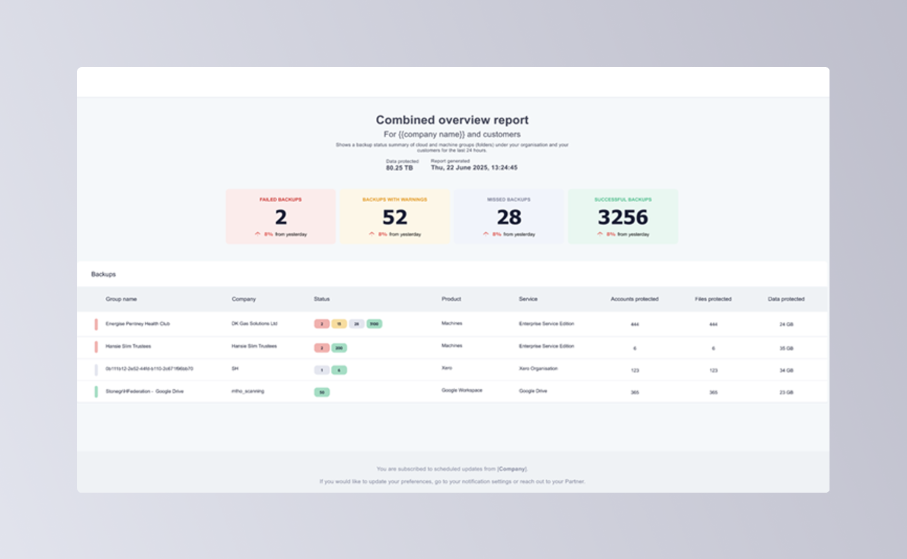
Scheduled Reporting
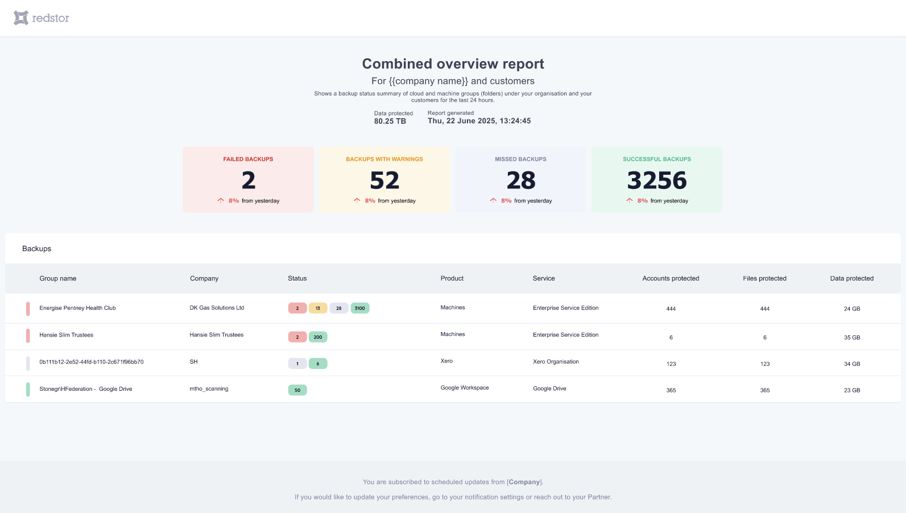
Partners and customers can now create, configure, and schedule email reports directly from RedApp, providing clearer operational visibility and easier customer reporting.
SharePoint and OneDrive Permission Recovery
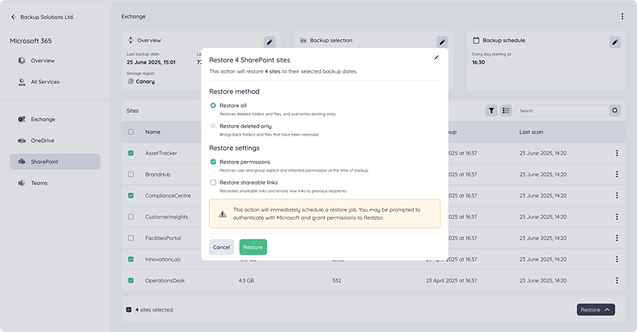
When restoring SharePoint data, administrators can now recover permissions and shareable links alongside files, eliminating the need for time-consuming manual reconfiguration across:
- Microsoft SharePoint
- Microsoft OneDrive
For partners, this means faster, more complete recoveries with less hands-on effort, helping your customers get back to business quickly in any disaster recovery or data loss scenario.
Bring Your Own Key Vault
Customers can now use their own key vault to store backup encryption keys, providing MSPs with full control over encryption management and security policies.
These new features enable organizations to implement additional layers of security and data access control. They are particularly useful for scenarios where companies need to provide their customer organizations with additional assurance of data access exclusivity, ensure cloud service independence, or increase resilience against cloud outages.
Organizations can integrate an external key management service using Azure Key Vault, AWS KMS, or continue to use CyberSentriq's System Key Vault. This integration is compatible with Microsoft 365, Microsoft Entra ID, and Google Workspace products. Access to encrypted data is strictly controlled through the chosen key management system, ensuring only authorized users within the KMS can access the data.
Administrators can securely export a master encryption key as a contingency measure. This ensures data remains accessible in the event of cloud service disruptions or temporary KMS inaccessibility.
These capabilities are designed for organizations with stringent data governance requirements, cloud service strategies, or regulatory obligations related to access exclusivity and cloud service independence.
What’s Next
Improved Backup Selection
Selecting backup data will become clearer and faster with:
- Improved confirmation workflows
- Expanded tenant visibility
- More responsive account displays
Unified Login & App Switching
We’re rolling out Unified Login across TitanHQ and Redapp platforms. Soon, users will be able to:
- Access both platforms with a single set of credentials
- Authenticate seamlessly using Microsoft, Google, or email/password credentials
- Reduce password reset requests and speed up customer onboarding
- Enjoy a consistent, unified login experience
Bring Your Own Identity Provider: Organizations will be able to use their own SSO via Microsoft Entra ID, OKTA, or any SAML-compliant provider.
Enhanced Security: MFA, step-up verification, authenticator apps, and passkeys will protect every account, with sensitive actions requiring fresh identity confirmation.
Jan 26th, 2026 Update
M365 Permissions BackUp & Recovery
Backing up data is only part of the picture. To truly maintain security and meet compliance requirements in Microsoft 365, organizations also need the ability to back up and recover SharePoint and OneDrive permissions with precision.
CyberSentriq now extends its Microsoft 365 protection by automatically backing up SharePoint permissions for all new SharePoint data backups initiated from the RedApp (available in our early access program). This ensures that managed access and security controls can be accurately restored alongside your data.
Important: Permission restoration is only available for backups completed after this feature is enabled. Permissions cannot be restored from SharePoint backups taken prior to this release.
When recovering SharePoint data using the RedApp, you will be prompted to configure restore settings. At this stage, you can choose to:
- Restore permissions (enabled by default)
- Restore shareable links (optional)
These options apply to both full site recoveries and individual item-level restores, giving you granular control over how data and access rights are reintroduced into your environment.
By protecting permissions alongside data, CyberSentriq helps ensure that restored content remains secure, compliant, and accessible only to the right users, without manual reconfiguration. Recovery is fast, simple, and frictionless, reducing operational burden and accelerating time-to-value.
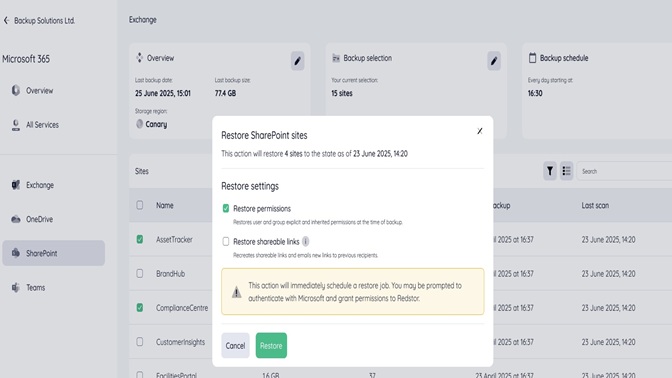
SharePoint permissions and sharing links recovery is now available. Please keep an eye out for the next update on protecting OneDrive permissions, which will be included as part of the Microsoft 365 backup product we are launching in the next few weeks.
Q4 Update, December 5th, 2025.
Since the launch of CyberSentriq, there have been significant developments across the solutions with even more innovation planned for 2026. Here are the latest releases.
Cybersecurity
Email Security Enhancements
-
SEG & ICES - Email Security Efficacy - Detection capabilities have been upgraded to block a higher volume of spam and phishing threats with increased accuracy.
-
SEG - DMARC Exemption for Customer and Domains - DMARC bypass exemptions now allow admins to whitelist trusted senders whose messages may fail authentication. This ensures essential communications are delivered without compromising security.
Security Awareness Training Enhancements
- Entra ID Integration & Outlook Add-in - We’ve introduced an Outlook add-in that allows users to report phishing simulations. This enhances campaign management, supports gamification, and strengthens overall security posture.
Platform Enhancements
- Ease-of-Use Enhancements - Several improvements have been made to the MSP dashboard, including new help menus, an updated phishing simulation card, and enhanced email archiving capabilities.
- Rebranding & White Label Capabilities - MSPs can now apply their branding across the platform in just a few clicks. Customisable email warning banners further support a consistent and professional customer experience.
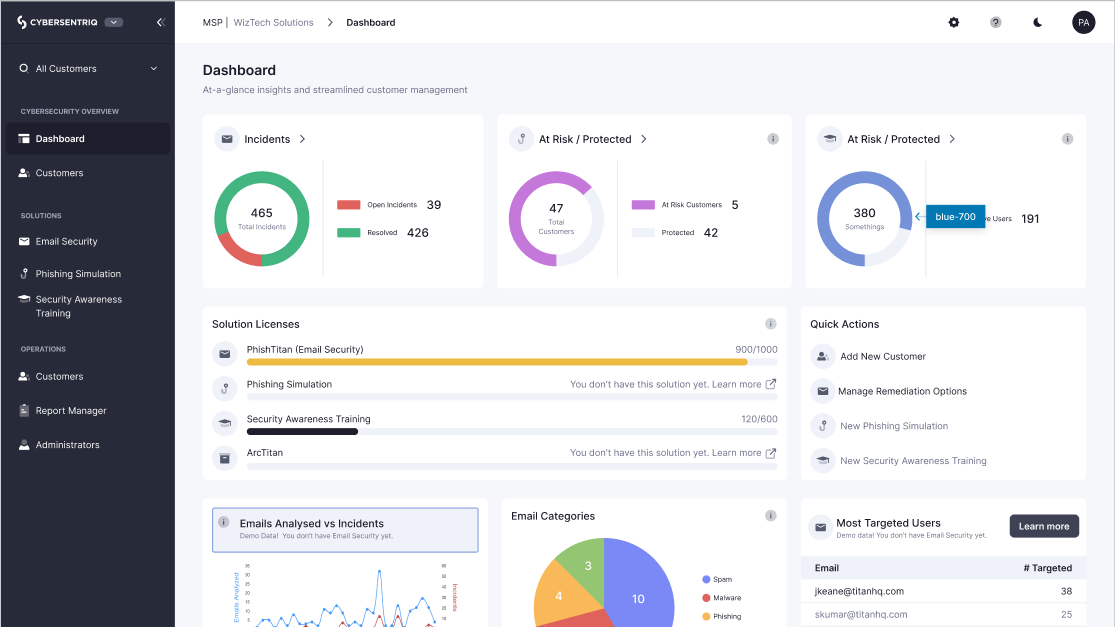
Read more on platform enhancements.
Data Protection
- Microsoft 365 and Google Workspace – Users can now recover Exchange, OneDrive, Gmail or Gdrive accounts to a different account, which is usefl when admin needs to recover ex-employee data to their line manager.
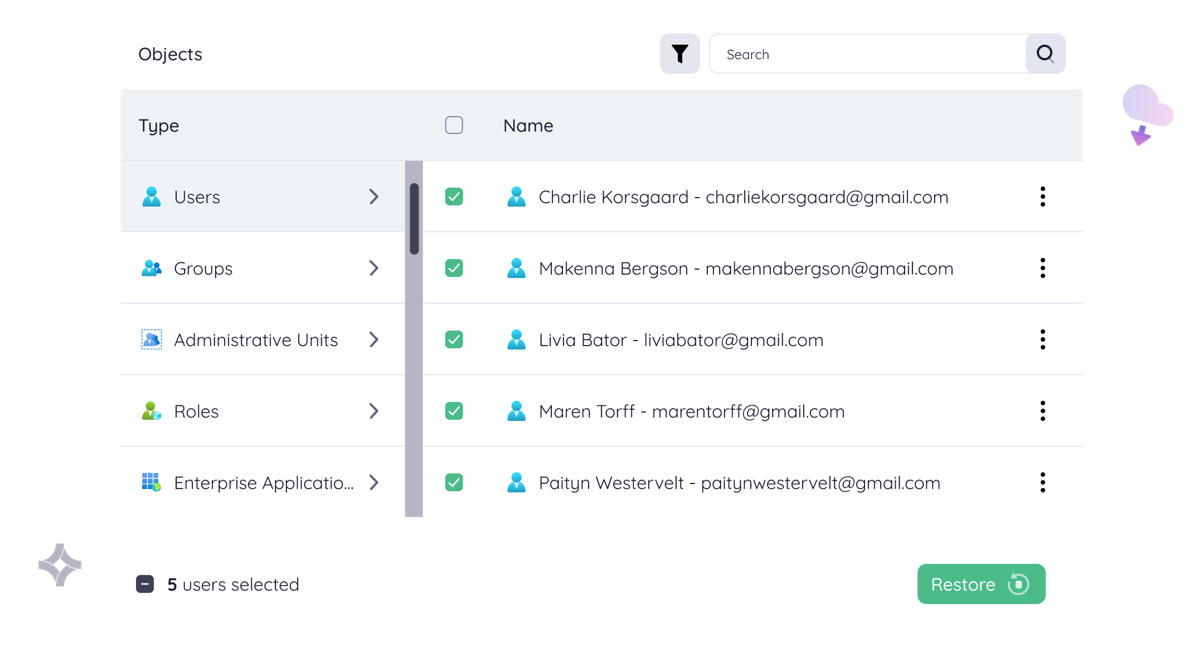
- Entra ID Backup – This solution is now market leading, with comprehensive coverage of protection, relationship recoveries, bulk recoveries, and filtering.
- Error messaging and reporting – Partners and customers can now create, configure and schedule email reports from RedApp.
- Backup selection enhancements – Improvements have been made to how customers are selecting data, including confirmation, tenant information, and displaying accounts more responsively.
- Machines – Broader support for a variety of new OS versions are being released.
New: Entra ID Backup enhancements
New: RedApp reporting
Read more on data protection product updates.
What's Next
We have lots planned for the remaining quarter, with huge features being released in 2026. Here are some of the features you can expect to see.
Cybersecurity
Email Security
- ICES - Email History - Enhanced mail-flow visibility is coming to our phishing solution. You’ll be able to view full email histories along with concise email summaries for faster investigation and response.
- ICES - MX Integration - Early Q1 will see full integration between the Phishing Protection Solution and the Secure Email Gateway. This combines MX record–based routing with pre-inbox threat detection, further strengthened by advanced API-level defence through the ICES solution.
- ICES – Next-Gen NLP Detection - Advanced natural language processing capabilities will be incorporated to further improve detection of social engineering techniques and business email compromise (BEC) attacks.
- SEG - New Onboarding Process - A streamlined onboarding experience is being introduced for the Secure Email Gateway in the platform.
Security Awareness Training (SAT)
- SAT - Multilingual Support - Support for more than 15 languages is being introduced, expanding accessibility and learner engagement across global teams.
- SAT – New Content Library – A new library of content will be added.
Coming soon: Email History

Data Protection
- Early Access for SharePoint permissions – Early Access will start on 21st January, and will be followed by OneDrive and Gdrive. Anyone is welcome to join the programme and be the first to experience this upgraded version of the M365 Backup product while helping us identify any issues/ further improvements.
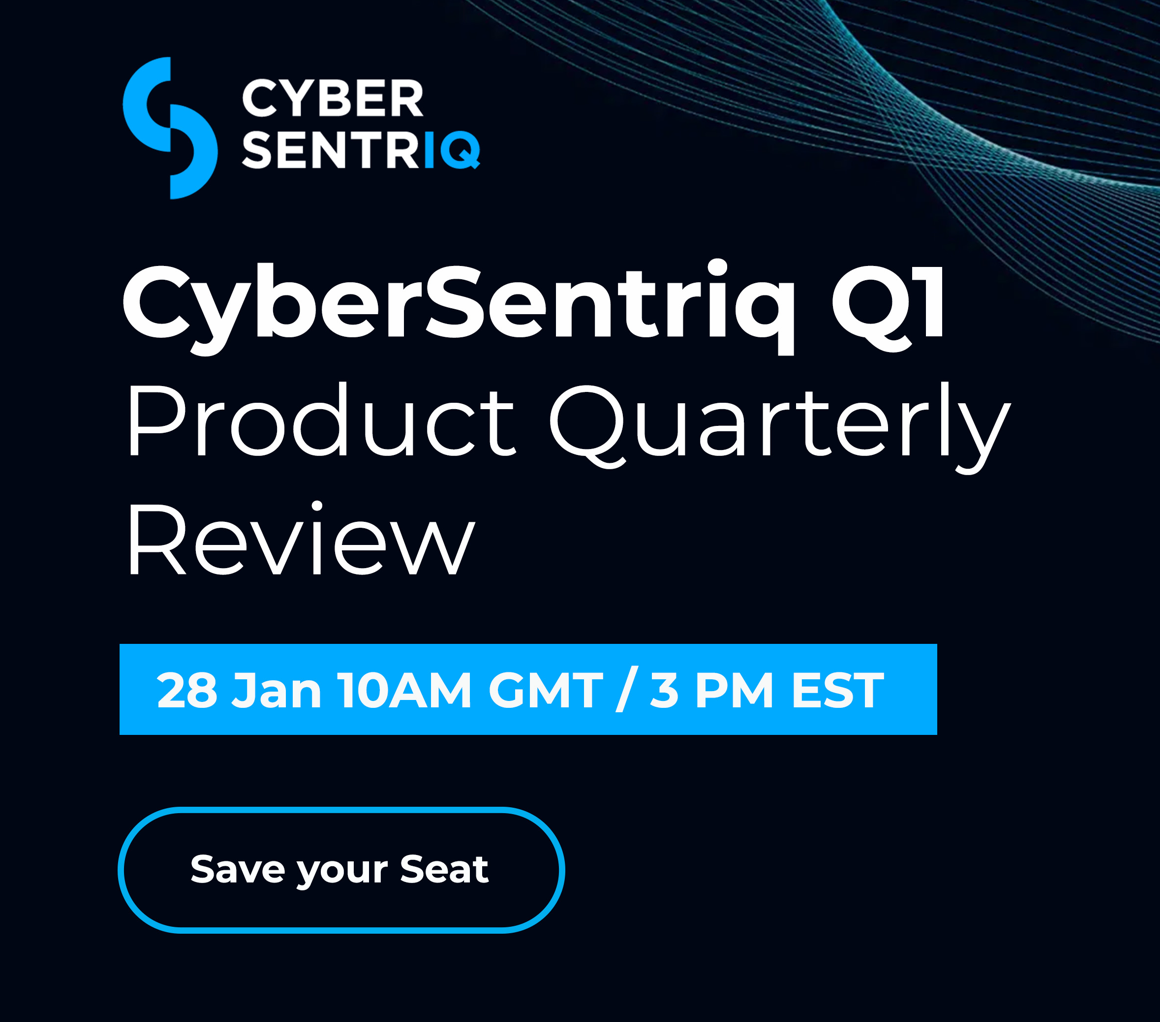
Register and attend our next webinar to view the 2026 CyberSentriq roadmap.
Discover the CyberSentriq 2026 Roadmap
Join Head of Product Development, Dan Boddington on January 28th, for an exciting webinar on the 2026 product roadmap.
Discover the latest updates on the exciting features released within the CyberSentriq platform throughout 2025 and hear what features are coming up next as we unveil our roadmap for the upcoming quarter, showcasing our innovative developments, updated design to enhance your experience and the latest technology.
Save your seat and register today.
Q3 Update, September 2nd, 2025
In Q3, we strengthened our email security and security awareness training solutions with enhanced functionalities. See all updates.
CyberSecurity
Email Security Enhancements
Social Engineering detection and protection
More powerful and advanced social engineering detection powered by Natural LanguageProcessing (NLP) added to PhishTitan. Our NLP is interpreting email intentions and blocking new, sophisticated phishing attacks.
Outlook Add-In Enhancement
This release allows users to report phishing simulations to identify vigilant users. This includes a pop-up message to confirm.
What’s new:
- Report Spam: In addition to reporting phishing and safe (previously called “clean”) emails, users can now report spam directly from Outlook.
- Instant positive feedback: When users correctly identify and report phishing training emails (lures), they’ll receive immediate positive reinforcement.
- Behavior tracking: Positive reporting behavior is now captured and tracked in the SAT/Phishing solution, helping teams measure and celebrate progress.
- Improved experience: A refreshed design with new icons and clearer feedback messages makes the add-in easier and more intuitive to use.
- New Report Manager for Security Awareness Training available for End Customers - Customers can now view or download in PDF format metrics around user SAT compliance and the campaigns they have been enrolled in.
- New Content Manager - This feature allows customers upload their own Video and PDF training material for inclusion in their SAT campaigns.
- In addition to these excellent features there have been multiple UX enhancements, these include:
- New Campaign Creation user interface available in Phishing Simulation and Security Awareness Training
- Clickable customers and user lists when creating campaigns
- New table component allowing resize, reordering of columns as well as choosing which columns to view
Read more: Security Awareness Training Release Blog
Enhanced End User Configurations
Users now have more flexibility to manage unwanted emails with the ability to release or block them themselves, such as marketing emails.
Bulk upload
Admins can now bulk upload to the allow/block list with a CSV
DMARC Bypass
Allow MSPs to bypass DMARC by adding IP exceptions, which reduces the number of emails that customer admins have to release from quarantine.
Stealth/Monitor Mode
When enabled, Stealth mode lets MSPs see how effective email security is for a customer without impacting end users, such as not adding banners to emails, which is helpful in trials.
Read more: Phishing Simulation Release Blog
Enhanced Remediation Control
This quarter, we strengthened our phishing protection solution with enhanced remediation functionality. Admins now have more control over where to send remediated emails. By default, remediated emails are sent to the Junk Email folder. Admins now have the option to send remediated emails directly to the Deleted Items folder.
Roles & Permissions
We’ve improved role-based access controls to include email obfuscation for read-only roles.
Read more: Email Security Release Blog
MSP Platform Branding
We recently introduced MSP Branding to the TitanHQ cybersecurity platform, a powerful new feature designed to help your MSP business stand out and strengthen customer trust.

MSP Branding automatically applies your display name and logo across the entire Platform. With a single click, your brand is instantly propagated to all solutions, making it easy to reinforce your identity, showcase value, and stand out from competitors.
With MSP Branding, you can now:
- Apply custom branding across the platform
- Set a unique display name
- Upload your brand logos
- Personalise email security banners
Read Release Notes: Platform Release Blog
Data Protection and Recovery
Recover to a different account - M365 & GWS
Users can recover Exchange, OneDrive, Gmail or Gdrive accounts to different accounts – great for when admin needs to recover ex-employees data to their line manager.
Entra ID Backup Enhancements
The Entra ID Backup solution is now market leading, with a comprehensive coverage of protection, relationship recoveries, bulk recoveries & filtering.
- Relationship recoveries
- Bulk recoveries
- Filtering options
Entra ID Backup protects users, groups, admin units, roles, and enterprise apps.
Microsoft 365 Backup – Restore to an Alternate Mailbox.
Admins can now recover Exchange, OneDrive, Gmail, or Google Drive data into a different account. Perfect for moving an ex-employee’s files to their manager without any fuss.
Azure VM Backup – introduction of VM policies and support for multiple daily snapshots
Take control with new VM policies and support for multiple daily snapshots: more flexibility, more recovery points, less stress.
RedApp - ConnectWise PSA integration
Streamline your operations with our new ConnectWise PSA integration—sync tickets and updates automatically, cutting manual effort.
RedApp – Improved error handling and notifications
Errors shouldn’t leave you guessing. Expect more precise explanations and smarter real-time notifications to keep you on top of issues.
RedApp – Global search
No more hunting around. Global search in RedApp makes finding users, tenants, or accounts quick and effortless.

RedApp – AI Error Handling (RIA)
Say hello to RIA (Redstor Intelligent Assistant). Our AI-driven error handling helps you troubleshoot instantly, with clear guidance on how to fix problems.
Read More Product Updates - Redstor Community
Launch of New Bundles
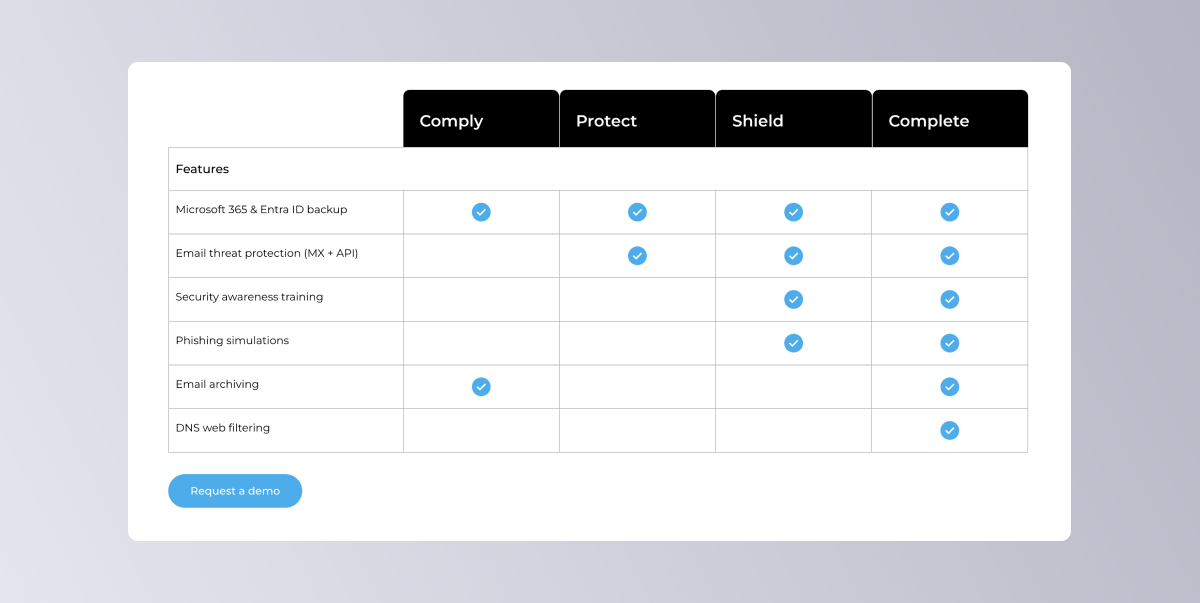
This quarter, we were delighted to launch our new CyberSentriq bundles to all TitanHQ and Redstor legacy customers. These bundles bring even more value to our customers.
CyberSentriq bundles combine multi-layer email protection (MX & ICES), Microsoft 365 Backup, phishing defence, and user training into robust cloud-native solutions. Built for MSPs, IT teams, and growing businesses, our bundles strengthen your defences while keeping management simple and scalable.
Don’t miss out, take a closer look at the new CyberSentriq bundles designed to give your business an edge today. Sign up for a demo or discovery call with one of our CyberSecurity experts.
What’s Next
CyberSecurity
We’ve been listening to your feedback, and some exciting new features are just around the corner. Here’s your first look at what’s in the pipeline:
- MX Integration – Integration of Secure Email Gateway & ICES into the Platform, which combines MX record–based routing with pre-inbox threat detection. This is backed by advanced API-level protection through the ICES component.
- PhishShield Enhancement – leverages customer data to improve efficacy rates for each customer.
- Security Awareness Training – The next generation of Secure Awareness Training is on its way, featuring content enhancements and AI-driven auto-lure generation.
- API – Opening up Public API access for seamless partner and technology integrations.
Data Protection and Recovery
SharePoint, OneDrive & GDrive permission recovery
When recovering SharePoint admins can choose to restore permissions & shareable links reducing the RTO and ensuring seamless recovery.
Smarter Error Messages and Enhanced Reporting – Planned for Q3
Partners & customers can now create, configure & schedule email reports from the RedApp for M365 Backup. We are also introducing expanded error messaging, which provides more detailed information to the customer and keeps everyone in the loop automatically.
RedApp – Introduction of standard operational reports, directly to your inbox.
Stay informed with operational reports delivered directly to your inbox. No extra clicks needed.
Enhanced error handling – making day-to-day admin easier.
We’re making day-to-day admin easier with even sharper error handling and more precise guidance for fixes.
Machine backup – Expanded hypervisor support.
More environments, more protection. Expanded hypervisor support is on the way for machine backup.
Machine backup – Extended OS support
We’re adding broader support for both Windows and Linux operating systems, providing you with even more flexibility in protecting your machines.
Integration
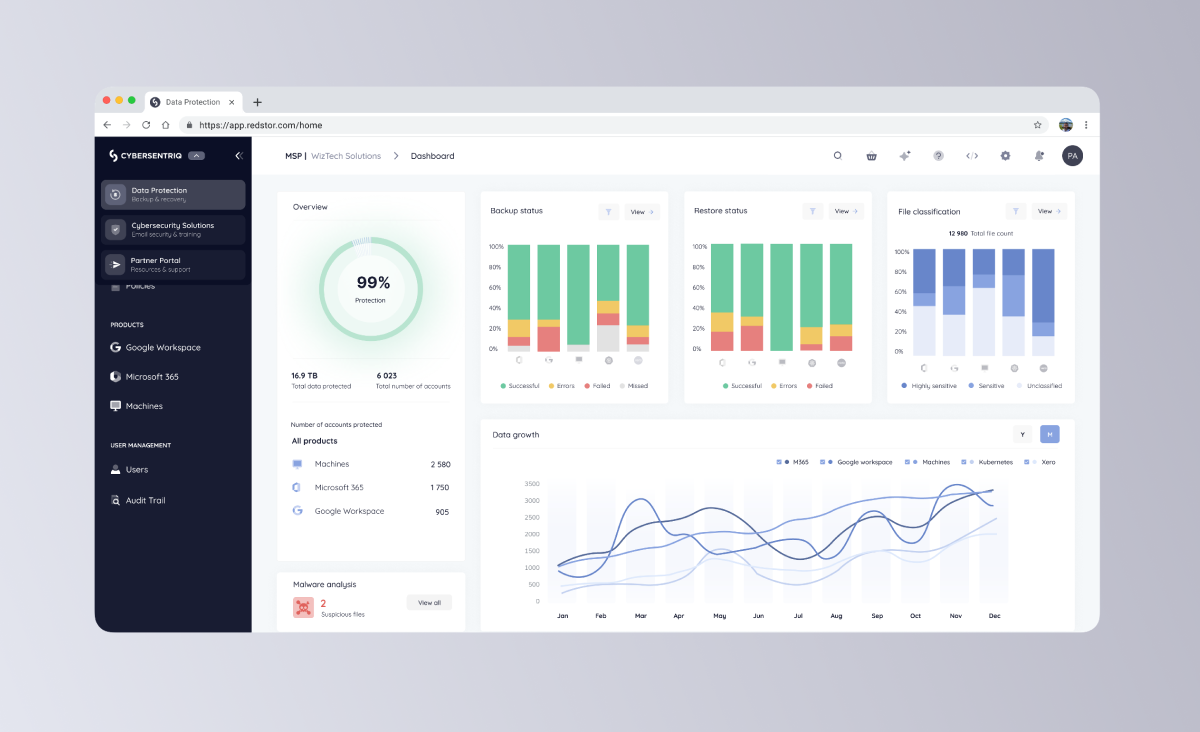
Platform Integration
To be released in Q4, Users will be able to switch between the data protection platform, the email security platform & the partner portal seamlessly.
Your input shapes the future of CyberSentriq (previously TitanHQ & Redstor). Have a feature in mind? Tell us what you’d love to see next, we’re building our solutions and features with you in mind
Ready to get started?
